Dice
A dice tray on the board. Roll any die with one click, type any roll you like, roll with advantage, and save the rolls you make often as buttons. Each Dice tile keeps its own dice, saved rolls and log, so you can have a tray per monster.
- Default size
- 4 × 4 (smallest 3 × 3)
- More than one
- Yes, each with its own name and log
- Players can see it
- Yes, on the players' window
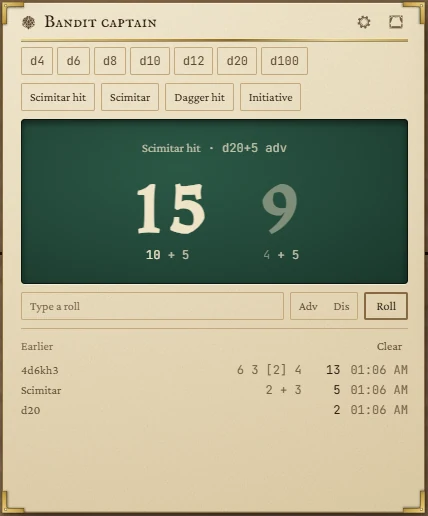
Rolling
- Click a die (d4 to d100) to roll it at once.
- Click a saved roll to roll it; the result is labelled with its name. Hover the button to see the roll it makes.
- Type a roll in the box under the tray and press Enter or Roll. While the box has focus, clicking dice adds them to it: d6, d6, d8 gives
2d6+d8; type+3yourself. - Advantage or disadvantage: press Adv or Dis before rolling. It applies to the next roll that has a single die to double, then switches itself off. Both results show side by side and the one not used is dimmed.
The tray shows the total large, with the working underneath. Natural 20s and natural 1s are called out, and dice that a keep rule dropped are struck through.
What you can type
| Write | Rolls |
|---|---|
d20+5 | A d20 plus 5. |
2d8+1d6+3 | Different dice in one roll. |
4d6kh3 | Four d6, keep the highest three. k3 means the same. |
2d20kl1 | Two d20, keep the lowest. |
d20+5 adv | With advantage (or dis). Works whenever there is one die to double, so d6+2 adv works too. |
Up to 100 dice of 2 to 1000 sides in one roll. If the app can't read what you typed, the tray suggests the forms above. Rolls use your computer's cryptographic random number source.
The log
On a tile tall enough, earlier rolls are listed under Earlier, newest first, with the dice, total and time. The last 50 are kept, even after you close the app. Clear empties it.
Dice settings
Press the gear in the tile's title bar.
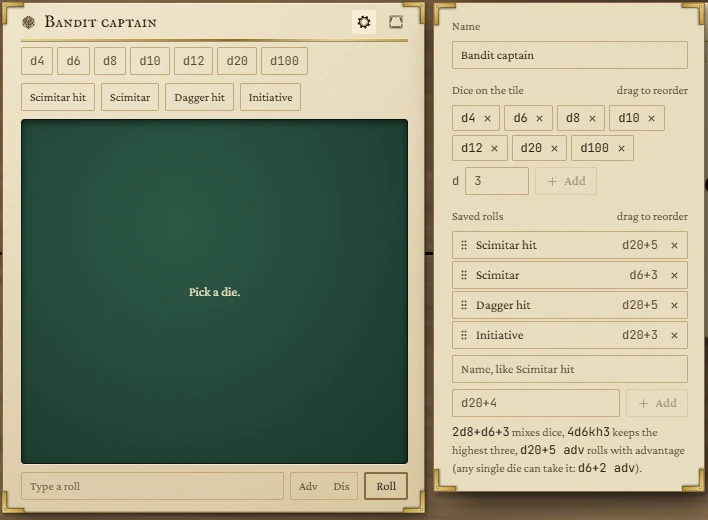
- Name: the tile's title, such as the monster it rolls for.
- Dice on the tile: remove one with its cross, or type a number of sides after d and press Add (up to 10 dice). Drag to reorder.
- Saved rolls: give a name (Scimitar hit) and a roll (
d20+4) and press Add. Up to 12. Drag to reorder, or focus one and press Alt with an arrow key.
Changes save at once. Esc or a click outside closes the panel.
Small tiles
At its smallest the tile shows only the die buttons and the result. From 4 × 4 it adds the saved rolls, the typing box and the advantage buttons; taller still, the log.
Showing rolls to the players
The curtain button in the title bar sends the tray to the players' window, On the stage or Beside the stage. Your rolls then show there as you make them, until you press the button again. See The board.