Timer
A countdown or a stopwatch, with its own name, lengths and chime. Use one for a burning torch, a ritual, a timed puzzle or a break, and keep as many running as you need.
- Default size
- 3 × 3 (smallest 2 × 2)
- More than one
- Yes, each with its own settings
- Players can see it
- Yes, on the players' window
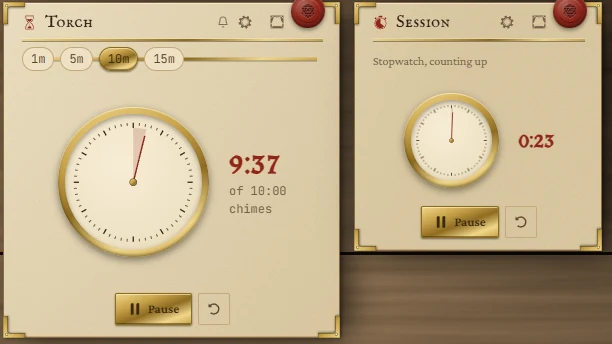
Counting down
- Pick a length from the chips along the top (1m, 5m, 10m, 15m to start with), or click the time itself and type one.
- Press Start. It becomes Pause.
- The arrow button beside it resets to the full length.
At zero the time pulses at 0:00, the chime plays if one is set, and the main button reads Reset.
Typing a length
Click the time while the timer is stopped. A plain number means minutes; you can also write minutes and seconds or units. Enter sets it, Esc cancels.
| Write | Means |
|---|---|
5 | 5 minutes (1.5 is a minute and a half) |
1:30 | 1 minute 30 seconds |
1:00:00 or 1h | An hour |
90s, 1h 30m | Units work too |
Anything from one second to 24 hours.
Stopwatch
Set Up, as a stopwatch in the settings to count up from zero instead. A stopwatch has no lengths and no chime. Hours show as h:mm:ss.
Timer settings
Press the gear in the title bar. Changes save at once.
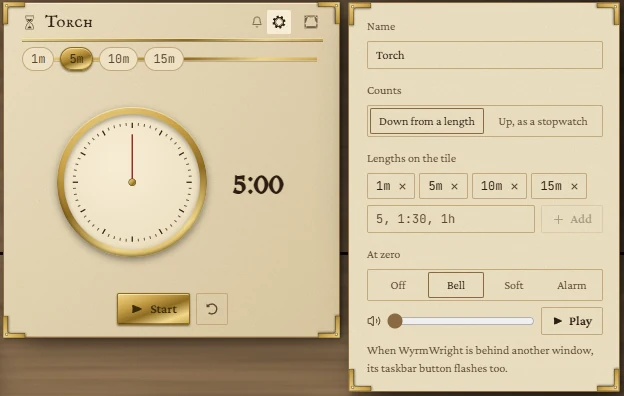
- Name: shown as the tile's title.
- Counts: Down from a length or Up, as a stopwatch. Switching resets the timer.
- Lengths on the tile: up to six chips. Remove one with its cross; type a new one (
5,1:30,1h) and press Add. - At zero: Off (the default), Bell, Soft or Alarm. Choosing one plays it, and Play plays it again. The slider sets its volume. A bell in the title bar shows the timer will chime.
It keeps time when you look away
- A countdown rings on time even when WyrmWright is behind another window or you are on another page; the app's taskbar button flashes too.
- A countdown remembers when it will end, so it is still right after you close and reopen the app. One that ran out while the app was closed shows 0:00 when you come back.
- A stopwatch stops when the app closes, keeping the time it had counted.
- Taking a timer off the board cancels its chime.
Small tiles
At two rows tall the tile shows just the time and the buttons. From three rows it adds the length chips and the dial.
Showing it to the players
The curtain button in the title bar sends the timer to the players' window, On the stage or Beside the stage, so the table can watch the torch burn down. See The board.