Party
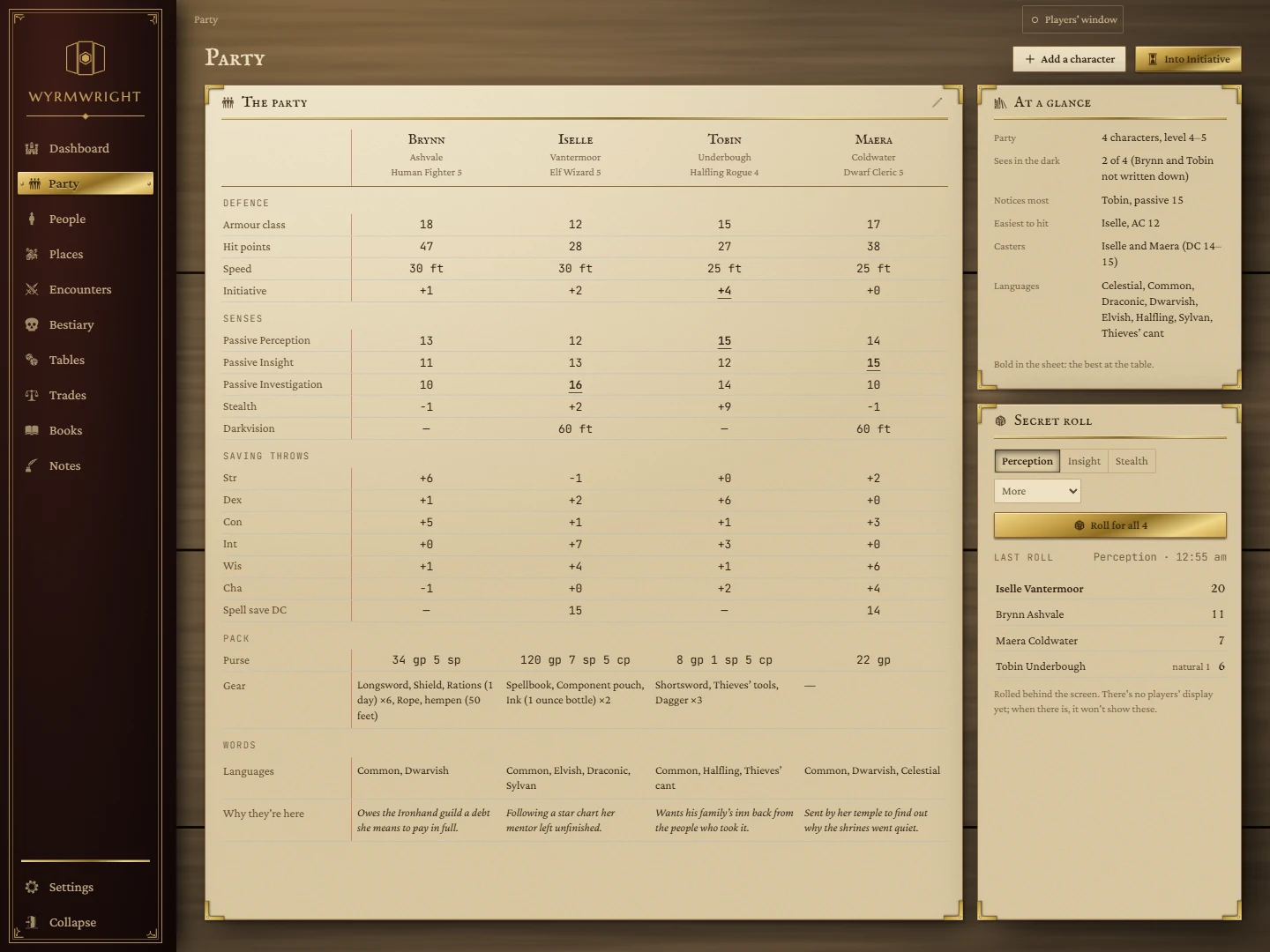
The characters at your table, side by side: the numbers you look up mid-session, the answers to questions about the whole table at once, a secret roll for everyone, and each character's purse and gear.
- Where
- Party, in the rail
- Feeds
- Initiative, Party Packs, Store Inventory
- Saved
- When you press Add or Save
Add your characters
- Press Add a character at the top right.
- Fill in what you know. Only Name is required; armour class, hit points and the three passive scores are enough to start, and everything else can wait.
- Press Add (or Enter in any box).
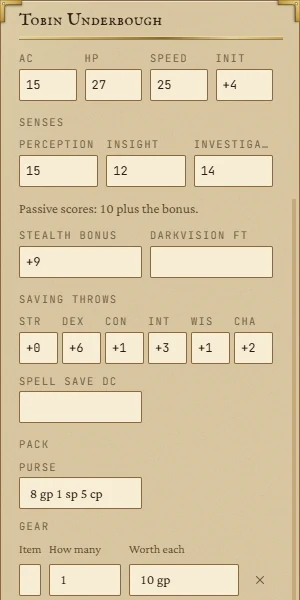
To change a character later, click their name at the top of their column, or click any value on the sheet: the editor opens on the right with that box ready to type in. Press Save to keep the change or Cancel to drop it. If you try to leave with unsaved changes, the app asks first.
What each box takes
| Box | What to write |
|---|---|
| Name, Race, Class, Level | The character. The sheet shows the first name large and the rest underneath. |
| Tag, Played by | Anything that helps you tell them apart, such as a character number and the player's name. |
| AC, HP, Speed, Init | Armour class, maximum hit points, speed in feet, and the initiative bonus. |
| Perception, Insight, Investigation | The passive scores: 10 plus the bonus. |
| Stealth bonus, Darkvision ft | The Stealth bonus (not passive) and darkvision range in feet. Leave darkvision blank if you don't know; write 0 for none. |
| Saving throws, Spell save DC | Each save's bonus, and the spell save DC for casters. |
| Purse | Coin, written like 12 gp 5 sp, or a plain number for gold. |
| Gear | What they carry: the item, how many, and what each is worth. Things bought at a shop arrive here by themselves. |
| Languages, Why they're here | Languages separated by commas, and a line about what brought them to the story. |
Bonuses can be written as +3 or -2. A blank box means "not written down" and shows as a dash on the sheet; it is never counted as zero.
Reading the sheet
- Rows are grouped into Defence, Senses, Saving throws, Pack and Words.
- With more than one character, the best value at the table is marked in the Initiative row and the three passive rows, so you can see at a glance who notices the ambush.
- Long gear lists are cut to four lines; hover to read the whole list.
- To rename the sheet (it starts as The party), press the pencil at the top right of the card, type a name and press Keep.
- To change the column order, open a character and use Move left or Move right.
At a glance
The card on the right answers the questions you ask about the whole table. A line appears only when there is something written down for it:
- Party: how many characters, and their level range.
- Sees in the dark: how many have darkvision, naming anyone who doesn't and anyone whose darkvision isn't written down.
- Notices most: the highest passive Perception.
- Easiest to hit: the lowest armour class.
- Casters: who has a spell save DC, and the range.
- Languages: every language anyone at the table speaks.
Secret roll
Roll one check for the whole party behind the screen, without asking anyone to roll.
- Pick the check: Perception, Insight or Stealth, or another from the More list (Investigation and the six saving throws).
- Press Roll for all. Each character rolls a d20 plus their bonus. For the passive checks the bonus is the passive score minus 10.
The results are listed highest first, with the best highlighted. Hover a result to see the die and the bonus; natural 20s and natural 1s are marked. Anyone with nothing written down for that check is skipped and named underneath. The last roll stays on the card until you roll again, even after you close the app. Secret rolls are never shown on the players' window.
Into Initiative
When a fight starts, press Into Initiative. Every character who isn't already in the tracker is added to the Initiative tile with a rolled initiative (d20 plus their bonus), their armour class and their hit points, and the app takes you to the board. A character with no AC written down comes in at 10, and with no hit points at 1, so fill those in first.
Purses, gear and shops
The purse and gear on this page are the same ones shown in Party Packs and in a shop's bill of sale. When a character buys something in a Store Inventory shop, the coin comes out of their purse here and the item lands in their gear; selling works the other way round. Editing a character doesn't undo a purchase made while the editor was open: the pack is only rewritten if you changed it yourself.
Removing a character
Open the character and press Remove from the party, then confirm with Remove. The No button sits exactly where you clicked, so a double click cancels rather than removes.