Notes
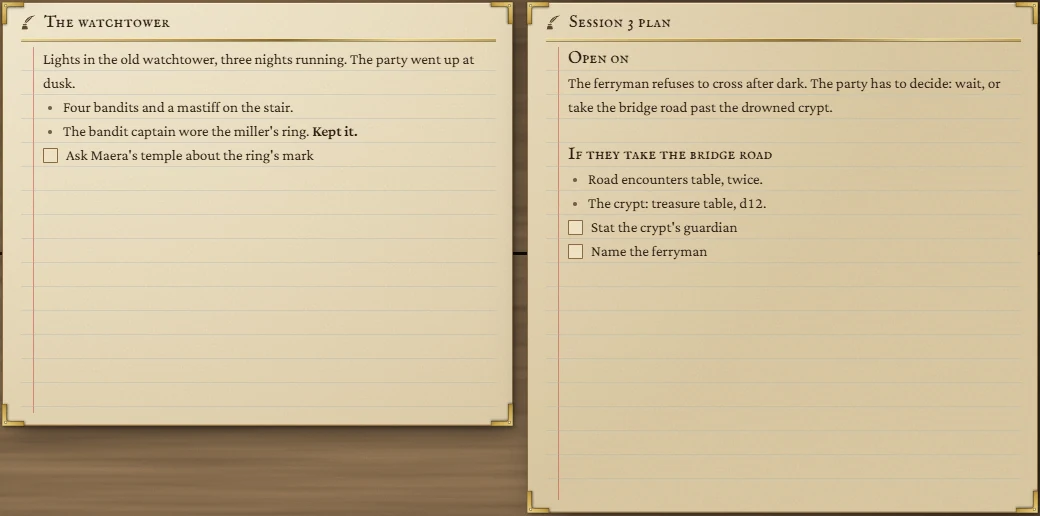
A note on the board, to write in while you play. Every Notes tile shows a note from your Notes library, so whatever you write here is in the library too, and the other way round.
- Default size
- 5 × 4 (smallest 3 × 2)
- More than one
- Yes, each showing its own note
- Same notes as
- The Notes page
Writing
A new Notes tile is an empty page: click and start writing. The first words you type make a new note in your library; an empty tile adds nothing. Everything saves as you type. The tile's title is the note's title, or Notes until it has one.
There's no toolbar on the tile, but formatting works from the keyboard:
| Type | For |
|---|---|
| Ctrl + B / Ctrl + I | Bold / italic |
- at the start of a line | A bulleted list |
[ ] | A box to tick |
The full toolbar is on the Notes page.
Naming people with @
Type @ and start a name to open a list of matches: your notes, your Notion pages (if Notion is connected) and Just the name. Use the arrow keys and Enter to pick one. On the Notes page, clicking an @name opens what it points to.
You can also drag names in: drop a name from the Name Generator, a person from an NPCs tile or a row from a Notion database onto the tile, and they're written in as @names where you drop them.
Where the note lives
- To put an existing note on the board, open it on the Notes page and press Put this note on the board. A Notes tile showing it appears on the Dashboard.
- Changes made on the Notes page, or in another tile showing the same note, appear in the tile (not while you're typing in it).
- Taking the tile off the board doesn't delete the note: it stays in the library.
- If the note is deleted from the library, the tile says so and offers Start a new note here.