Name Generator
Names for people, settlements, regions, taverns, shops and more, ready when a player asks the barkeep's name. Everything you roll is scratch until you keep it, and any name can be dragged onto another widget.
- Default size
- 7 × 7 (smallest 5 × 5)
- More than one
- No
- Works with
- Initiative, NPCs, Store Inventory, Notes
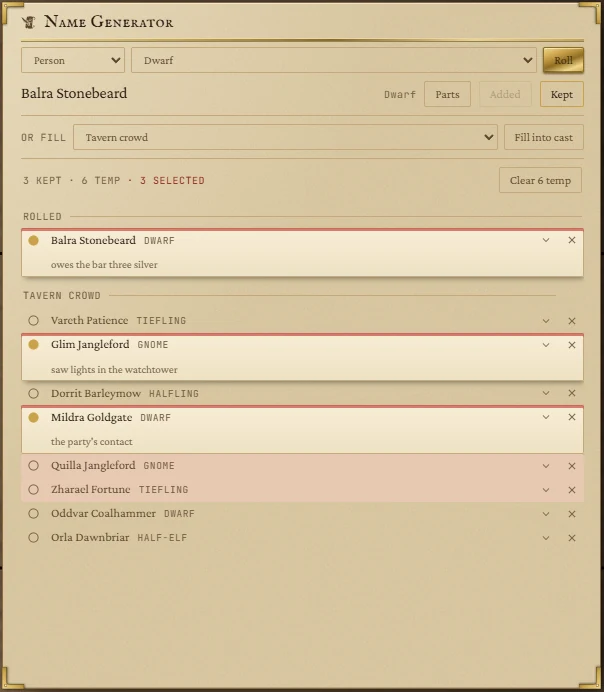
Rolling a name
- Choose what to name: Person, Settlement, Region, Tavern, Shop or Misc.
- Narrow it with the second list: a person's race, a settlement's size (city, town, hamlet), a region's kind, a tavern or shop's form, or a misc name's kind (ship, order, festival, street).
- Press Roll for another. Changing either list rolls a fresh one too.
The name lands on the bench, the line under the lists. From there:
- Add puts it on the list as scratch, to compare with others.
- Keep puts it on the list and keeps it.
- Drag the bench name straight onto another widget.
The nine races each have their own naming pattern: dwarves carry a clan name, orcs a deed-name, tieflings a virtue, and so on.
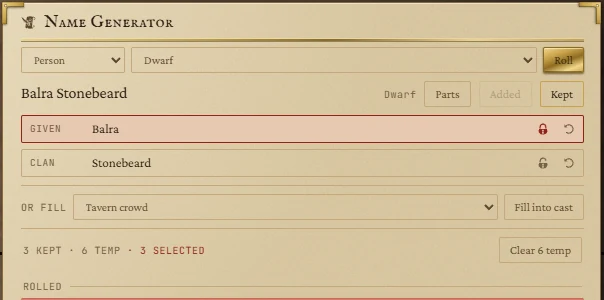
Parts
Press Parts to see the pieces a name is built from (a dwarf's given name and clan, a tavern's adjective and noun). Type over a part to change it, or press its arrow to re-roll just that part. The chevron on any row in the list opens the same parts.
Filling a scene
On a tile at least six rows tall, the or fill line rolls a whole group at once: a Tavern crowd (eight people), a Market row (seven shops), Villages upriver (six hamlets) or Landmarks (six regions). Press Fill into cast. The names arrive at the top under the scene's heading, each with a line of detail you'll see as the hint when you keep it.
Keep and clear
Everything on the list is scratch until you keep it. Click the circle at a row's left to keep it (it fills in); click again to let it go. A kept name gains a line for a note, such as who they are.
The count line shows how many are kept and how many are scratch. Clear sweeps every scratch name, after asking:

No sits where Clear was, so a double click cancels rather than sweeps. To clear just one group, hover its heading and press the cross. The cross on a row removes that row.
Dragging names to other widgets
Click a row to select it; Shift-click selects a run, Ctrl-click picks out several. Drag any selected row and all of them go together. Esc clears the selection.
| Drop on | What happens |
|---|---|
| Initiative | They join the fight as foes. Fill in their numbers in the tracker. |
| NPCs | They join the roster as names, to flesh out when the party talks to one. |
| Store Inventory | A shop name opens a shop; a person becomes the keeper of the open shop. |
| Notes | They become @names in the note. |
A dragged name carries its parts too (race, family name and so on), so the widget it lands on knows more than the words.